
Anyone who has used Microsoft 365 Copilot knows that the quality of the response depends largely on how the request is formulated. Yet in daily practice, most users stop at the simplest prompt: "summarize this document", "analyze this data", "write an email". Decent results, but ones that often turn out to be too generic.
There is a specific technique that makes it possible to significantly raise the level of detail and relevance of Copilot's responses. It is called role prompting, and it consists of assigning Copilot a precise professional role before formulating the request. The result changes markedly and, instead of the usual generic response, you get an analysis from an expert's perspective.
In this article we look at how to apply role prompting in real work contexts.
What Is Role Prompting?
Role prompting is a prompt engineering technique that consists of telling Copilot which professional role or perspective to adopt before responding. In practice, you instruct the assistant to behave as a specific type of expert would, such as a business analyst, a legal consultant, a marketing manager, or a CFO.
The underlying logic is simple: the language models on which Copilot is based are trained on enormous amounts of text produced by people with very different roles and skills. When you assign a specific role, you guide the model to select and apply the type of reasoning, vocabulary, and priorities typical of that professional figure.
Why does role prompting work better than a generic prompt?
Imagine having to analyze a strategic company document. A generic prompt such as "analyze this document" will return a summary of the contents, perhaps well structured, but without a truly critical perspective. Copilot does not know who it is working for, what objective the reader has, or which aspects matter most.
A prompt with role prompting, on the other hand, completely changes the picture. If you specify "act as a senior business analyst and analyze this document", Copilot will orient the response toward what is relevant for that figure, such as strengths and weaknesses of the analysis, consistency between objectives and data, strategic gaps, and operational implications.
Role Prompting: How to Build a Prompt
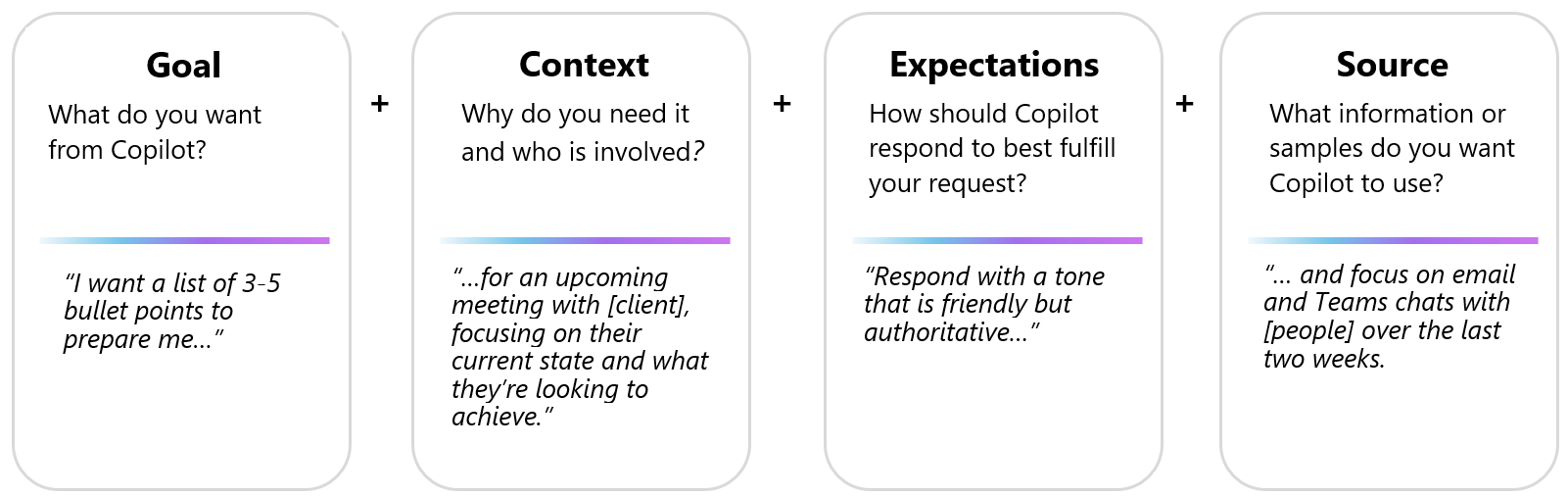
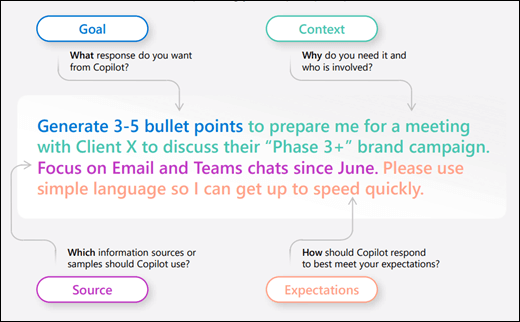
According to Microsoft's guidelines on effective prompting, a good prompt should always include a few essential elements:
- a clear objective,
- relevant context,
- expectations about the format or depth of the response,
- a source to work from.
Role prompting acts precisely on the context, defining the professional framework within which Copilot must operate. It is not always necessary to include every element, but the more components you include, the more targeted the response will be.
Putting these elements together, a complete prompt might be: "Act as a senior business analyst. Analyze the attached document on Q1 results and provide: a summary of the key points, the main decisions made and their rationale, any issues or risks identified, and recommended follow-up actions for my role."
With this approach, for example, you can obtain structured analyses of a real company document, with Copilot producing a multi-level structured analysis covering the summary, decisions, assigned actions, open questions, and even the most significant key quotes from the meeting.
One of the most useful applications of role prompting, often underestimated, is what could be called reverse critical analysis. In this case, instead of only asking what the document says, you ask Copilot to indicate what the document does not say.
The prompt in this case can be simple, and it should be sent as a continuation of the previous one: "Now also indicate the open questions that this document does not answer."
This step is particularly important when analyzing strategic reports, commercial proposals, project documents, or any text that presents conclusions without making all the premises explicit. Copilot, reasoning from the perspective of the assigned role, is able to identify blind spots, such as missing information, unverified assumptions, or scenarios that have not been considered.
The result is an analysis that does not simply mirror the content of the document, but interrogates it critically, exactly as an experienced consultant would when reading a proposal for the first time.
Examples of Role Prompting
The role prompting technique can be applied to almost any professional context. Changing the role in the prompt means changing the lens through which Copilot looks at the same document or data.
- Analyzing a financial report: "Act as a CFO who needs to present this data to the board of directors. Analyze the attached report, highlight the significant variations compared to the previous quarter, the main financial risks, and the operational recommendations."
- Reviewing a commercial proposal: "Act as an experienced procurement manager. Evaluate the attached proposal from the perspective of economic value, contractual clarity, and potential risks for the company."
- Analyzing a marketing campaign: "Act as a marketing director with B2B experience. Analyze the attached campaign plan, identify the strengths, gaps in the strategy, and unexploited opportunities."
- Preparing for a meeting: "Act as a chief of staff. Analyze the agenda and the attached preparatory documents, indicate the decisions that require priority attention, those that can be delegated, and the missing information that would be useful to have before the meeting."
In all these cases, the assigned role guides Copilot to select the most relevant information for that specific perspective, to use the appropriate register, and to structure the output consistently with the expectations of someone in that role.
A technical detail that makes a difference in response quality is the management of conversation context. Copilot keeps track of the entire previous conversation in the same chat, and this context can "contaminate" a new request if it is not related to the previous one.
A good practice is to open a new chat every time you change document or topic. This way, Copilot starts from a blank page and there is no risk of mixing information from previous requests with the current one. It is a small adjustment that has a concrete impact on the consistency and precision of responses.
Furthermore, role prompting works even better when combined with an iterative approach, which means starting with a structured prompt, evaluating the response, and then going deeper with follow-up requests that remain consistent with the assigned role. Each subsequent question builds on the context of the role already established, and Copilot consistently maintains that perspective throughout the conversation.
Getting Started with Wole Prompting: Where to Begin
No technical background is needed to start using the role prompting technique. You simply need to have two main elements clear in mind: the role you want Copilot to take on and the result you want to obtain.
A good starting point is to identify one of the recurring analyses in your work (for example a monthly report, a proposal review, or a data analysis) and rewrite the usual prompt by adding the role at the beginning. The comparison with the previous result will be immediate and, in most cases, clear enough to make role prompting a permanent habit.
To make the difference clearer, let us compare the two approaches directly on the same task.
Conclusions
Writing a good prompt is a skill that improves with practice, and role prompting is one of the most accessible tools for making a concrete quality leap in the way you work with Copilot every day.
The difference between asking "analyze this document" and "act as a senior business analyst and analyze this document" may seem minimal, but in practice it changes the value of what you get, reducing manual reworking, offering more ready-to-use analyses, and above all guaranteeing responses that speak the language of your own professional role.
As with any tool, the result depends on how you use it. Role prompting is not a magic formula, but a structured approach that, once internalized, becomes a natural part of the daily workflow with Copilot.
If you want to build a library of customized prompts for your team, to apply to specific roles and processes, the Copilot Circle team can support you throughout the journey toward a more mature and strategic use of Microsoft 365 Copilot.
FAQ on Role Prompting with Microsoft 365 Copilot
What is role prompting?
Role prompting is a prompting technique that consists of assigning Copilot a specific professional role before making a request. In this way, Copilot orients the response according to the perspective and priorities typical of that figure, producing more targeted and relevant analyses.
Does role prompting work with all types of documents?
Yes. The technique can be applied to any type of content: reports, emails, presentations, spreadsheets, meeting transcripts, commercial proposals. The important thing is that the document is accessible to Copilot, either via attachment or referenced with the "/" symbol in the chat.
Is it necessary to use a specific format for the prompt?
No. Copilot is designed to respond to natural language, so no precise syntax is required. However, explicitly including the role, the task, and the expected output noticeably improves the quality of the response.
What is meant by "reverse critical analysis"?
It is the variant of role prompting in which, after obtaining the main analysis, you ask Copilot to identify the open questions or missing information in the document. It is useful for identifying strategic gaps, unverified assumptions, or scenarios that have not been considered.
Can I use role prompting in Teams or Outlook as well?
Yes. Role prompting works in Copilot Chat and in the Copilot integrations within Teams, Outlook, and the other Microsoft 365 apps. The technique is independent of the access point and applies in the same way in all contexts.
How important is it to open a new chat between different requests?
It is an important best practice. Copilot maintains the context of the entire active conversation: if you change topic without opening a new chat, previous requests can negatively affect the quality of subsequent responses. Opening a new chat ensures that Copilot works on a clean context.
Does role prompting require a specific license?
No. The technique can be applied with the standard Microsoft 365 Copilot license. It does not require additional features or particular tools: it is simply a more structured way of formulating requests.


Sign up for our newsletter
Enhance your skills with free updates, news, and resources from Copilot Circle.
Discover our guide to Microsoft Copilot, featuring verified prompts, 100+ industry-specific use cases, and effective adoption strategies for integrating AI in your work.