
Microsoft 365 Copilot has come a long way since the days when it was primarily a tool for writing emails faster or summarizing long documents. Throughout 2025, the platform has introduced a category of agents designed to tackle a completely different kind of work: no longer quick, everyday tasks, but complex activities requiring reasoning, analysis, and synthesis across multiple levels.
Researcher and Analyst are the two agents that best represent this evolution. Both available with the Microsoft 365 Copilot Premium license, built on next-generation artificial intelligence models, and capable of producing output of a quality that is difficult to achieve with traditional Copilot. In this article, we look at what distinguishes them, how they work in practice, and when it makes sense to use one over the other.
What is "deep reasoning"?
To understand the value of Researcher and Analyst, it is helpful to start with a conceptual difference from the Copilot used every day.
Standard Copilot is designed to respond quickly to a question within a few seconds. It is an excellent tool for routine tasks (email drafts, meeting summaries, quick searches) but it is not designed to tackle complex problems that require cross-referencing many sources, reasoning over data, and producing structured, verifiable output.
Deep reasoning agents follow a different logic.
Instead of responding immediately, they break down the received problem into smaller steps, gather information from different sources, evaluate intermediate results, and build the final response only after an iterative process of analysis. This takes more time, sometimes several minutes, but the result is something much closer to the work a specialized professional would do. It is like having a dedicated researcher or data analyst always available, without needing them on staff.
Researcher: What It Is and How It Works
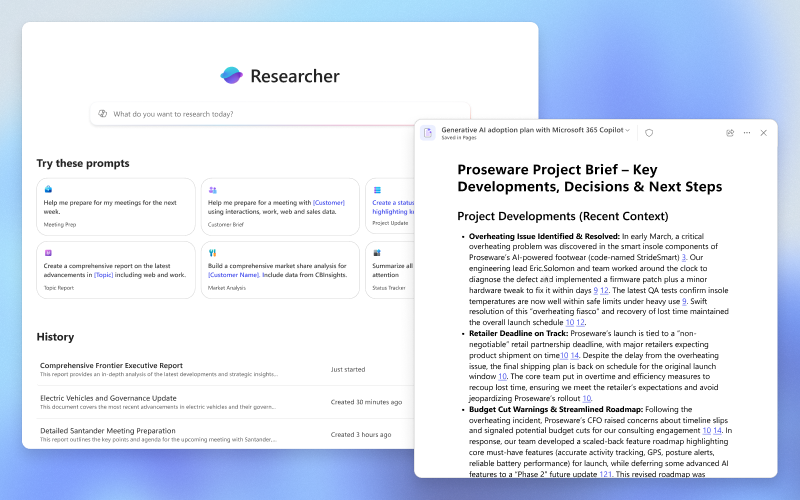
Researcher is designed to handle multi-step, articulated research that combines sources internal to the organization and information from the web. The model it is based on is OpenAI Deep Research, integrated with the orchestration and search capabilities of Microsoft 365 Copilot.
The internal process follows a continuous cycle of reasoning, retrieval, and revision of information.
Researcher does not simply search and aggregate, it reasons over what it finds, discards less relevant information, deepens critical points, and builds a coherent report. It is possible to follow this process in real time, as the agent shows the steps it is taking as it progresses.
A typical use case is competitive research: starting from a structured prompt, Researcher is able to cross-reference competitor data from the web with internal product documents stored on OneDrive and SharePoint, producing a comprehensive comparative analysis complete with tables and source citations.
Before starting the research, you can choose exactly where to draw information from, for example, only from company data, only from the web, or from both. For market research it makes sense to enable everything, while for a synthesis of internal documents it is preferable to stay within the corporate ecosystem. Researcher also supports integration with third-party data through connectors to platforms such as Salesforce, ServiceNow, and Confluence, to further enrich searches with data from systems outside the Microsoft ecosystem.
The final report from Researcher is structured with sections, headings, and graphical visualizations. Every relevant statement is accompanied by a source citation, which makes the document not only readable but also verifiable and shareable.
At the end of the research, Researcher offers the option to export the content to Word, PDF, PowerPoint, or as an infographic. Word and PDF formats are generally the most useful as a starting point, as they lend themselves better to subsequent reworking with other Copilot tools. Direct conversion to PowerPoint tends to produce less refined results: it is better to export to Word first, then use Copilot in PowerPoint to build the presentation from there.
Analyst: What It Is and How It Works
Analyst is the natural complement to Researcher.
Where Researcher works on textual and documentary information, Analyst deals with structured and quantitative data. Its goal is to move from a raw dataset to understandable and actionable insights, without the user needing to have technical analysis skills.
It is based on the OpenAI o3-mini model, optimized for analytical tasks, and reasons through a chain of steps. Each phase of the analysis builds on the results of the previous one, progressively refining the conclusions.
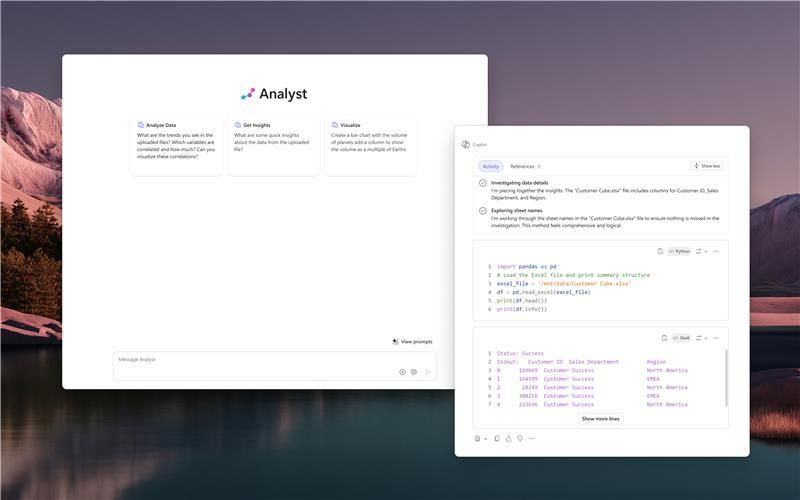
One of the most interesting features is the integration with Python: for more complex analyses, the agent generates and executes Python code in real time, which is visible during the process and upon completion. Those with technical skills can verify the methodology; those without can simply read the conclusions, without worrying about what is happening under the hood.
To understand what this means in practice, consider a sales or customer behavior dataset attached directly to the conversation. Starting from a single Excel file, without writing a formula or manually setting up a chart, Analyst is able to produce a textual narrative of the main insights, such as seasonal spending, high-value customer segments, sales channel performance. It then adds automatically generated charts, autonomous identification of anomalies in the data (such as income outliers or unrealistic age values), and a summary of the business implications with recommended actions for each segment.
Analyst works with the most common formats, including CSV and XLSX, and can also access files already present in the user's Microsoft 365 environment via Microsoft Graph.
Researcher or Analyst Agents: Which One to Choose?
The choice between the two agents depends on the type of source material, more than on the final objective.
- Use Researcher if you are starting from text, documents, emails, web pages, or information to be gathered and synthesized. Ideal for competitive research, market analysis, in-depth studies, synthesis of internal material, and reports with citations.
- Use Analyst if you are starting from numerical or structured data (Excel files, customer datasets, performance reports). Ideal for trends, segments, anomalies, correlations, and recommendations.
The two agents are not in competition. They solve different problems and, in many real-world workflows, they can be used in sequence: Analyst to analyze the data, Researcher to contextualize it within the market landscape.
The following table helps you orient yourself quickly.
Researcher and Analyst Agents: Availability and How to access in Copilot
Researcher and Analyst were announced by Microsoft on March 25, 2025, and became available to all license holders on June 2, 2025, after a preview period reserved for participants in the Frontier program.
A Microsoft 365 Copilot license is required to access them. From a security standpoint, both agents operate entirely within Microsoft 365's commercial data processing perimeter and comply with the same security, privacy, and regulatory compliance policies as the entire suite.
Both agents are included in the Microsoft 365 Copilot license at no additional cost and are pre-installed for all users who hold it. No specific configuration by the IT administrator is required, although administrators have the option to disable them at the tenant level from the Microsoft 365 admin center if necessary.
To use them, simply open the Microsoft 365 Copilot app, accessible via browser, desktop and mobile app, and Teams (on the latter, you need to access the full version from the app sidebar) and select the desired agent from the Agents section in the chat.
One important practical detail: Researcher and Analyst share a combined limit of 25 monthly queries per user, which resets on the first of each calendar month. The limit exists because these agents use computationally more intensive models compared to standard chat, reflecting the higher cost of each individual processing task. It is therefore worth reserving these queries for work where the added value is concrete: articulated research, analysis of significant datasets, reports intended for strategic decisions.
For quick questions and routine tasks, the standard Copilot chat remains far more efficient.
Researcher and Analyst Agents: tips for the best results
The quality of the output from both agents depends largely on how the initial request is formulated. A well-structured prompt makes a significant difference compared to a generic question.
For Researcher
- Explicitly indicate the sources to draw from: internal only, web only, or both
- Include in the prompt the type of expected output (e.g., "comparative analysis with table," "report with citations")
- Adding context about your role or objective helps Researcher calibrate the level and angle of the response
- If the research concerns specific documents, attach or reference them directly in the prompt
- When it asks for clarification before starting the research, it is optimal to provide additional details rather than simply confirming: the more context given at this stage, the better the quality of the final output
- Open a new chat when changing dataset or topic, to avoid previous results influencing the new analysis
For Analyst
- Attach the data file directly to the conversation before sending the prompt
- Specify the analyses you want to obtain: trends, anomalies, correlations, forecasts
- Explicitly request charts or visualizations if they are needed in the response
- Open a new chat when changing dataset or topic, to avoid previous results influencing the new analysis
Conclusions
Researcher and Analyst are two of the most concrete tools Microsoft has introduced into the Copilot ecosystem over the past year. They do not add superficial features, but change the type of work that can be delegated to artificial intelligence, shifting from simple, fast tasks toward activities that require analysis, reasoning, and the production of structured output.
For organizations that already hold a Microsoft 365 Copilot license, they are available today at no additional cost. The limit of 25 monthly queries orients toward targeted use, but for most professionals it is more than sufficient for the most relevant use cases.
If you want to understand how to integrate these tools into your organization's workflow, the Copilot Circle team is available to work with you on building a tailored adoption path.
Here is a summary table comparing Researcher vs Analyst.
FAQ on Copilot Researcher and Analyst
Are Researcher and Analyst included in the standard Microsoft 365 Copilot license?
Yes, both are included at no additional cost in the paid Microsoft 365 Copilot license. They are not available in the free version of Copilot Chat.
How many queries can be made per month?
The limit is 25 combined monthly queries between the two agents per user. The counter resets on the first of each month.
Where are they found in the Copilot interface?
In the Microsoft 365 Copilot app, in the Agents section of the chat. They are pre-installed and available without additional configuration.
What is the difference compared to standard Copilot chat?
Standard chat responds quickly to simple requests. Researcher and Analyst use more advanced reasoning models, take more time, and produce in-depth output with cited sources, charts, and professional report structure.
Is company data safe with these agents?
Yes. Both operate within the Microsoft 365 security perimeter and comply with the same privacy and compliance policies as the entire suite.
Are technical skills required to use Analyst?
No. Analyst independently manages the analysis, including any generation of Python code. The code is visible for those who wish to verify it, but it is not necessary to be able to interpret it to obtain useful results.
Is it possible to use Researcher and Analyst in sequence on the same project?
Absolutely. Many workflows benefit from both: Analyst to analyze the source data, Researcher to contextualize it in the relevant market or a broader landscape. The optimal approach is the multi-agent conversation in Copilot chat, calling the two agents with @: this way both operate within the same conversation, maintaining the accumulated context and producing a more coherent and integrated output.


Sign up for our newsletter
Enhance your skills with free updates, news, and resources from Copilot Circle.
Discover our guide to Microsoft Copilot, featuring verified prompts, 100+ industry-specific use cases, and effective adoption strategies for integrating AI in your work.