
When an organization introduces an AI assistant, the first question IT leaders ask usually isn't about features, it's about security. Who controls what Copilot can see? Where does company data end up? How can you make sure the answers it generates don't expose confidential information to people who shouldn't see it?
These are legitimate questions, and Microsoft has addressed them by building a governance architecture around Microsoft 365 Copilot. This article looks at how Copilot governance works, what tools it gives IT administrators, and why data security with Copilot is, in many respects, more solid than you might expect.
What Copilot governance means
Copilot governance is the set of controls, policies, and tools an organization can turn on to manage the use of Microsoft 365 Copilot securely and in compliance with regulations. It is a layered framework spanning identity and permission management, sensitive data protection, audit monitoring, and regulatory compliance.
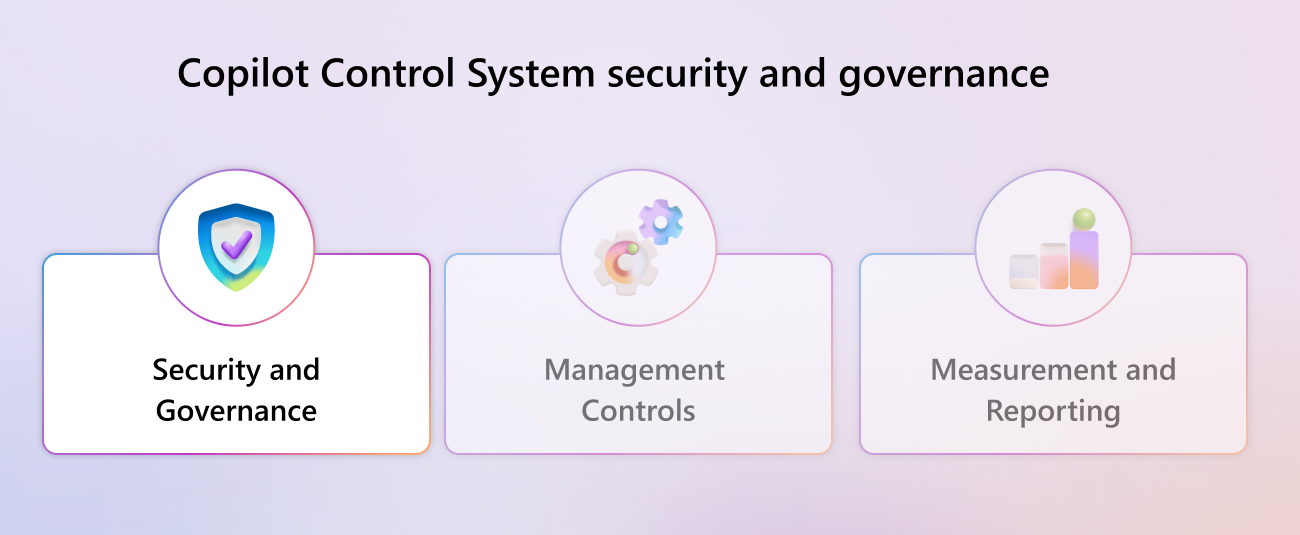
The starting point is the Copilot Control System, the control framework Microsoft designed to meet the security and governance needs of enterprise organizations. The framework rests on three main pillars: data security and governance, management controls, and measurement and reporting. This article focuses on the first pillar, the one most relevant to IT security teams.
How Copilot accesses company data
Before understanding how to protect data, it helps to understand how Copilot uses it. Microsoft 365 Copilot accesses company content through Microsoft Graph: documents, emails, chats, calendars, and meetings the user already has access to. There's no separate database and no parallel index: Copilot sees exactly what the person using it can see.
This principle has a direct consequence for governance: the permission models already configured in Microsoft 365 (SharePoint, Teams, OneDrive) automatically determine the boundaries of what Copilot can return. If a user doesn't have access to a document, Copilot can't cite it in its responses.
It's worth clarifying a point that's often misunderstood: everything that happens during a Copilot session, from prompts to responses to data retrieved via Microsoft Graph, never enters the AI models' training process. Processing runs on Azure OpenAI Service, separate from OpenAI's public services, and nothing is retained outside the Microsoft 365 boundary.
Enterprise Data Protection: the three core commitments
Microsoft 365 Copilot and Copilot Chat operate under Enterprise Data Protection (EDP), the contractual framework that extends to Copilot the same guarantees already in place for other Microsoft 365 services. The three core commitments are:
- Data security: encryption of data at rest and in transit, strict physical controls, and logical isolation between tenants through Microsoft Entra ID.
- Data privacy: data is only used according to the customer's instructions. Commitments include GDPR, the EU Data Boundary, ISO/IEC 27018, and the Microsoft Data Protection Addendum.
- Access controls: Copilot respects the identity model, inherits sensitivity labels, applies retention policies, and logs every interaction in audit logs.
These commitments also apply when third-party models integrated into Copilot are used, such as Anthropic's models, provided they are enabled as Microsoft subprocessors.
The Security Framework: three areas of focus
The Copilot Control System organizes security and governance into three distinct areas, each with specific controls depending on the license tier available. Controls are split between foundational (available with E3/A3/G3 licenses) and optimized (available with E5/A5/G5 licenses).
1. Data Security
The first goal is to protect the organization's information, with particular attention to the risk of oversharing: the unintentional exposure of sensitive content through overly permissive permissions on SharePoint sites or other repositories.
For a more detailed comparison between the Business and Enterprise plans, including the specific data-security differences between them, see our dedicated Copilot Enterprise vs Business comparison.
SharePoint Advanced Management provides data-access governance reports that identify sites with potentially oversharing content. Admins can send review requests to site owners, restrict access at the organization level, and configure access controls based on Microsoft Entra security groups. These controls are available with E3 licenses.
It's worth noting that SharePoint Advanced Management has been included with every Microsoft 365 Copilot license since 2025: organizations that have assigned at least one Copilot license automatically get SAM features for all SharePoint admins, at no extra cost.
Sensitivity labels from Microsoft Purview Information Protection let you protect sensitive files persistently: the protection follows the file even when it's moved or downloaded from the tenant. Behavior differs by license: with E3, the system flags the presence of sensitive content to the user, leaving the decision to label it up to them; with E5, this step becomes automatic, with no action required.
Microsoft Purview DSPM (Data Security Posture Management) for AI is available with both license tiers, but with different capabilities. With E3 licenses, it lets you view app information, export activity, and turn on monitoring. With E5 licenses, you can also view the text of prompts and responses, and create risk assessments targeted at specific SharePoint and OneDrive locations, complete with automated policy recommendations.
Data lifecycle management is another important aspect: any outdated, ownerless, or no longer needed content increases the surface area exposed to Copilot. Cleaning up your content repository before deployment improves both security and the relevance of generated responses.
2. AI Security
The second area concerns protecting the AI tools themselves from specific threats, such as prompt injection attacks (attempts to manipulate the agent's responses through hidden instructions in documents) and misuse of generative features.
Copilot includes built-in protections against these risks, active with no extra configuration needed:
- Jailbreak protections: Copilot has specific classifiers for malicious prompt injections, including cross-prompt variants (XPIA), which intervene before the request reaches the model.
- Harmful content protections: the system filters generated responses, covering categories such as discriminatory or hateful language, sexually or violently inappropriate content, references to self-harm, and improper assessments of employee performance or status.
- Protected material safeguards: Copilot detects content subject to legal rights, including copyrighted text and code under license restrictions.
With E3 licenses, Microsoft Purview eDiscovery lets you search the text of Copilot prompts and responses. With E5 licenses, you can also delete the content you find, on top of searching it.
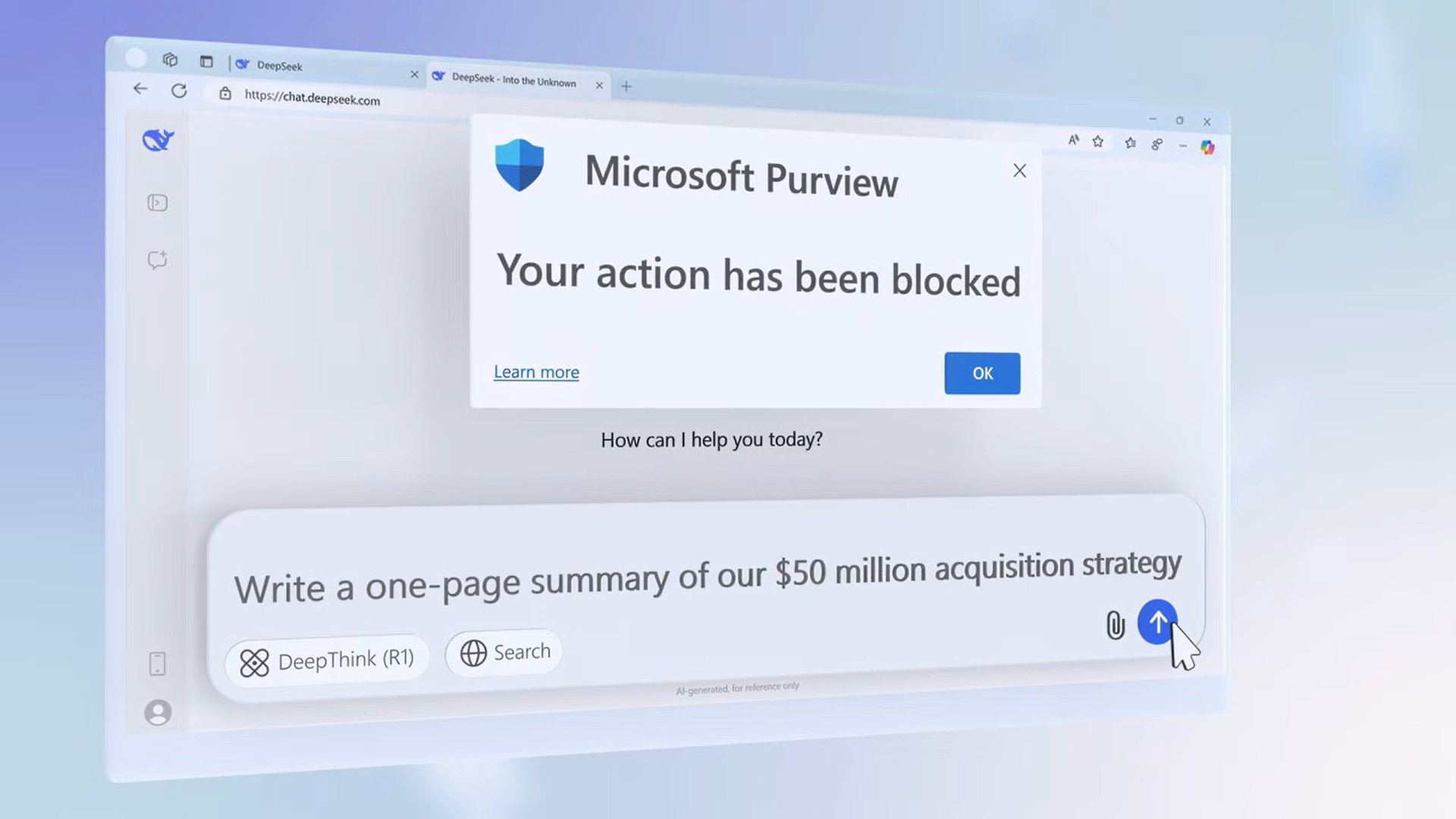
On the data-loss-prevention side, with E3 licenses Microsoft Purview DLP lets you set policies on SharePoint, Exchange, and OneDrive to get notified of non-compliant sharing. With E5 licenses, policies also extend to Teams and endpoints, and can be configured to stop Copilot from processing specific sensitive files. Insider Risk Management adds alerts for anomalous behavior and, through the Adaptive Protection feature, applies stricter policies in real time to users classified as high risk, available exclusively with E5 licenses.
3. Compliance and Privacy
The third area concerns the ability to demonstrate regulatory compliance and maintain the privacy of interactions. Microsoft Purview Audit logs every interaction with Copilot: user prompts, generated responses, referenced files. These logs are available for eDiscovery searches, legal holds, and internal investigations, starting with E3 licenses.
Interactions with Copilot are subject to the same retention and deletion policies as other Microsoft 365 content. Individual users can delete their own Copilot activity history from the personal Account portal (myaccount.microsoft.com). Admins can configure retention policies through Purview Data Lifecycle Management.
On data residency, Copilot is subject to the same contractual commitments as other Microsoft 365 services: as of March 2024, it was formally included within the scope covered by the Microsoft Product Terms, with full compatibility with the Advanced Data Residency and Multi-Geo options. For organizations based in the European Union, this translates into a guarantee that data stays physically within the European geographic area, in line with the EU Data Boundary framework.
With E5 licenses, Microsoft Purview Communication Compliance lets you receive an automatic alert in the event of a possible compliance violation or unethical conduct in Copilot interactions, directly triggering an internal investigation. This feature isn't available with E3 licenses.
Anthropic as a Microsoft Subprocessor: what changes for governance
Starting January 7, 2026, Anthropic operates as a Microsoft subprocessor for Microsoft 365 Copilot. This means Anthropic's models (Claude) are now integrated into a range of Copilot experiences: Microsoft 365 Copilot, Researcher, Copilot Studio, Power Platform, Agent Mode in Excel, and the Word, Excel, and PowerPoint agents.
From a governance standpoint, the change is significant.
The integration happens within Microsoft's contractual framework, covered by the Microsoft Product Terms, the Data Protection Addendum (DPA), and Enterprise Data Protection. Microsoft remains responsible for Anthropic's compliance with these contractual commitments.
There are, however, a few important limitations IT leaders should be aware of:
- Anthropic's models are excluded from the EU Data Boundary: for organizations in the European Union, EFTA, and the United Kingdom, processing through Anthropic's models happens outside the European boundary. For this reason, the Anthropic toggle is disabled by default for tenants in these regions. As of April 3, 2026, however, Microsoft introduced a new setting in the Microsoft 365 admin center called “Copilot in M365 apps with Anthropic models”, available to tenants in the EU/EFTA and UK, which lets you enable Anthropic as the default model for Copilot experiences in Word, Excel, and PowerPoint even in European regions.
- Anthropic's models are not available in government clouds (GCC, GCC High, DoD) due to the lack of FedRAMP certification.
- Admins can manage enabling or disabling Anthropic as a subprocessor from the Microsoft 365 admin center, under Copilot > Settings > AI providers as Microsoft subprocessors.
For Italian and European organizations working under strict data-residency requirements, it's therefore necessary to actively check the Anthropic toggle configuration in your tenant, making sure it's aligned with your internal data governance policies.
Copilot Studio: governance for agents
When you go beyond out-of-the-box Copilot and build custom agents with Copilot Studio, governance requires extra attention. Agents can access external sources, perform actions, and publish to different channels: every extension point is a potential risk vector.
Copilot Studio's governance system gives admins a specific set of controls:
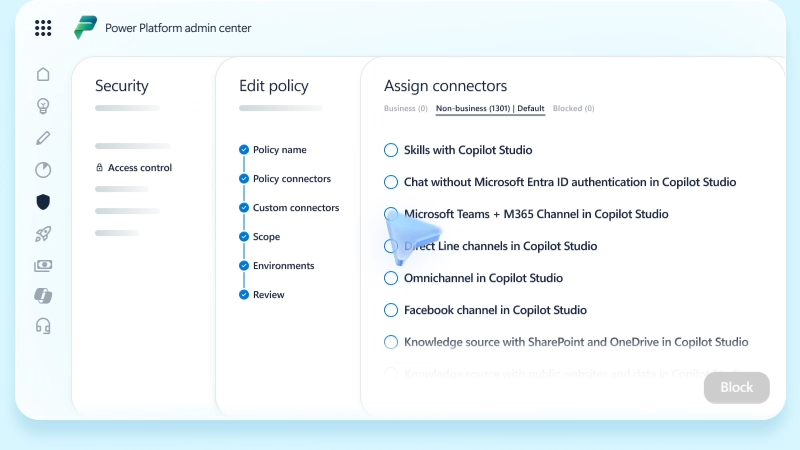
- Data policies (DLP) in the Power Platform admin center, which manage authentication, knowledge sources, connectors, HTTP requests, publishing channels, and autonomous agent triggers.
- Audit logs available in both Microsoft Purview and Microsoft Sentinel for monitoring agent authors' activity.
- Pre-publish security alerts that flag configurations deviating from security standards to authors before the agent is made available.
- Customer-managed encryption keys (CMK) for environments that require full cryptographic control.
- Customer Lockbox for secure access to customer data by Microsoft support. Note: Lockbox does not cover data transmitted by Copilot Studio as part of security audit logging.
- Sensitivity label visibility: agent authors and users can see the highest sensitivity label applied to the SharePoint sources used in the agent's responses. Responses generated by Copilot and by agents automatically inherit the highest-priority sensitivity label among the sources used to generate them. This also applies to documents Copilot creates from labeled sources. One notable technical limitation: when a file's sensitivity labels are configured with permissions customized by the user (rather than by the admin), agents cannot access that content, regardless of the access permissions of the user operating the agent.
Agents published to Microsoft 365 channels (such as Teams or SharePoint) are subject to the same tenant policies. Admins manage agents from the Integrated apps section of the Microsoft 365 admin center, with full visibility into each agent's required permissions, terms of use, and privacy notice.
Zero Trust: the reference model
Microsoft's recommended approach for solid Copilot governance is based on Zero Trust principles:
- Verify explicitly: no access is granted by default. Every identity, device, and request is verified through Microsoft Entra ID.
- Use least-privilege access: users and systems only have access to what they actually need.
- Assume breach: infrastructure is designed assuming breaches can happen, minimizing impact through segmentation and monitoring.
For Copilot, this translates into a systematic review of SharePoint permissions before deployment, configuring sensitivity labels, enabling Conditional Access through Microsoft Entra, and turning on monitoring through Purview.
Compliance requirements covered
Microsoft 365 Copilot is certified against the main international compliance standards. Coverage applies to the entire EDP framework and to data processed within Microsoft Online Services:
The Oversharing Problem: where to start
One of the most common mistakes before a Copilot deployment is assuming existing SharePoint permissions are already correct. In many organizations, years of informal sharing have created sites accessible to entire divisions, or even the whole tenant, even when the content should have stayed restricted. Copilot doesn't amplify this problem, but it makes it far more visible: if a document was technically accessible to 500 people but no one knew how to find it, with Copilot someone might get it as the answer to a question.
The recommended path has three phases:
- Phase 1: assessment
Use SharePoint Advanced Management's data-access governance reports to identify sites with organization-wide access or an unusual number of users with direct access. Before remediation is complete, you can apply temporary protections using the SAM Restricted Content Discovery (RCD) feature, which excludes sensitive sites from Copilot's indexing even without a permanent permissions fix, letting you immediately reduce exposure during remediation. With E5 licenses, DSPM for AI also offers targeted risk assessments for SharePoint and OneDrive, with automated policy recommendations for the highest-exposure sites.
- Phase 2: remediation
Remove excessive permissions, archive inactive sites, delete outdated files. SharePoint site lifecycle management helps identify sites that are ownerless or haven't been updated in a long time. You don't need to wait for perfection: a significant risk reduction is achievable within weeks. For high-value content you don't want to delete, Microsoft 365 Archive lets you archive it at a lower cost while preventing Copilot from processing it or including it in responses: a useful tool for reducing exposure without giving up the content.
- Phase 3: prevention
Turn on sensitivity labels, configure DLP policies, enable monitoring through Purview Audit. The goal is for new sharing to comply with established criteria from the start.
Conclusions
Governance isn't a brake on adoption: it's what makes adoption sustainable over time. Organizations that roll out Copilot without an adequate governance framework often end up dealing with difficult situations after deployment, when oversharing problems become visibly apparent or when an unexpected Copilot response raises questions about data security.
On the other hand, an overly restrictive approach that blocks access to any data risks undermining the value of the digital assistant: if Copilot can't access the content it needs to answer, it becomes useless.
The balance point lies in combining solid technical governance with a structured adoption path. Turning on technical controls isn't enough: people need to understand why those restrictions exist, how to use Copilot responsibly, and who to contact in case of anomalous behavior.
Copilot Circle supports organizations in both directions: from the readiness and security assessment phase through to ongoing employee adoption, with an AI Agent that guides every user toward responsible, productive use of Microsoft 365 Copilot.
If you're planning a Copilot deployment in your organization, or want to understand how to strengthen the governance of a deployment already underway, the Copilot Circle team is available for a dedicated consultation.
FAQ on Copilot Governance
Is company data used to train Microsoft's AI models?
No. Prompts, responses, and the data accessed via Microsoft Graph during Microsoft 365 Copilot interactions are not used to train the underlying language models. Processing runs through Azure OpenAI Service, and customer content is not stored outside the Microsoft 365 service boundary. Microsoft may use optional user feedback (a setting admins can turn on or off) to improve Microsoft 365 Copilot, but this feedback also doesn't enter the training process for the underlying models. Feedback controls can be managed by admins through the Microsoft 365 admin center.
Can Copilot access documents the user shouldn't see?
No. Copilot doesn't have a broader view than the user operating it: it can only retrieve and cite content the user already has access permission for in Microsoft 365. This also applies during semantic search: the tenant's identity model defines the boundaries within which Copilot operates, with no exceptions. If a document turns out to be improperly accessible, the cause always lies in the permissions configuration, not in Copilot.
What is “oversharing” and how is it prevented?
Oversharing happens when sensitive content is accessible to more users than necessary, often because of SharePoint permissions configured at the organization or site level without proper granularity. It's prevented through SharePoint Advanced Management's governance reports (available from E3), configuring sensitivity labels through Microsoft Purview, and, with E5 licenses, DSPM for AI, which provides automated risk assessments and policy recommendations specific to Copilot.
Is Microsoft 365 Copilot GDPR compliant?
Yes. Microsoft 365 Copilot is subject to Microsoft 365's existing privacy, security, and compliance commitments for commercial customers, including GDPR. For customers in the European Union, Copilot operates within the EU Data Boundary for Microsoft models. It's worth noting that the Anthropic models integrated into Copilot are excluded from the EU Data Boundary: for EU/EFTA/UK tenants, the Anthropic toggle is disabled by default and can only be turned on through an explicit admin decision.
How is Copilot usage monitored at the organization level?
Microsoft Purview Audit logs every interaction with Copilot, including prompts, responses, and referenced files. These logs are available for eDiscovery searches and internal investigations starting with E3 licenses. With E5 licenses, Purview's Data Security Posture Management (DSPM) for AI offers an aggregated usage view, with reports on sensitive files referenced in interactions, risk-management tools, and Activity Explorer, which also includes the web queries used during response grounding.
Are agents built with Copilot Studio subject to the same security policies?
Yes, with some specifics. Agents published to Microsoft 365 channels are subject to tenant policies and admin approval. Copilot Studio adds specific controls: DLP policies configurable from the Power Platform admin center, audit logs in Purview and Sentinel, pre-publish security alerts, and the ability to disable publishing of agents that use generative AI features across the entire tenant. Note that Customer Lockbox does not cover data transmitted as part of agents' security audit logs.
Are the Anthropic models in Copilot safe for European organizations?
Anthropic's integration as a Microsoft subprocessor, active since January 7, 2026, includes contractual coverage through the Microsoft Product Terms and Data Protection Addendum. However, Anthropic's models are currently excluded from the EU Data Boundary: processing happens outside the European boundary. For tenants in the EU, EFTA, and the United Kingdom, the Anthropic toggle is disabled by default. As of April 3, 2026, a specific new setting called “Copilot in M365 apps with Anthropic models” is available for EU/EFTA and UK tenants, letting you enable Anthropic as the default model for Word, Excel, and PowerPoint even in European regions, while still remaining outside the EU Data Boundary.
How is the privacy of users who use Copilot managed?
Interactions with Copilot are stored as part of the user's activity history, encrypted at rest, in line with the same retention policies as other Microsoft 365 content. Users can view and delete their own Copilot activity history from the personal Account portal (myaccount.microsoft.com). Admins can configure retention and deletion policies through Microsoft Purview Data Lifecycle Management, and can optionally include Copilot prompts and responses in legal holds through eDiscovery.


Sign up for our newsletter
Enhance your skills with free updates, news, and resources from Copilot Circle.
Discover our guide to Microsoft Copilot, featuring verified prompts, 100+ industry-specific use cases, and effective adoption strategies for integrating AI in your work.