Copilot usage across the sales team
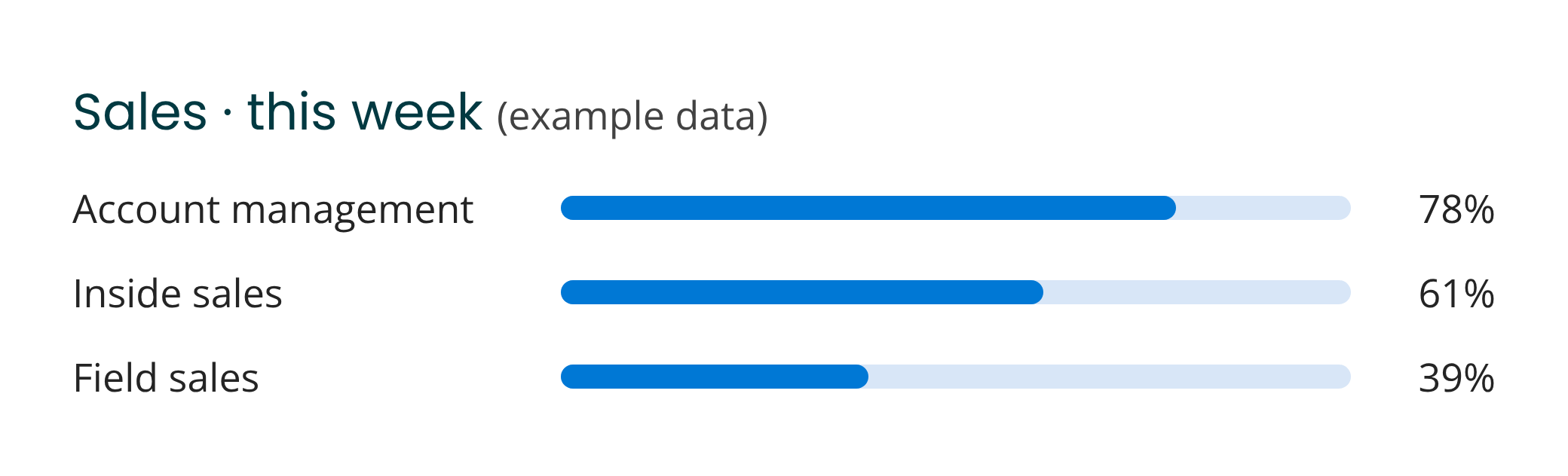
Usage by team, role and seller, updated in real time.

Meeting prep in minutes, follow-ups drafted right after the call and proposals built from your own templates. Copilot Circle helps your sales team do it with Microsoft 365 Copilot, on every deal.





Before each meeting, sellers dig through emails, notes and old proposals to see where the deal stands.

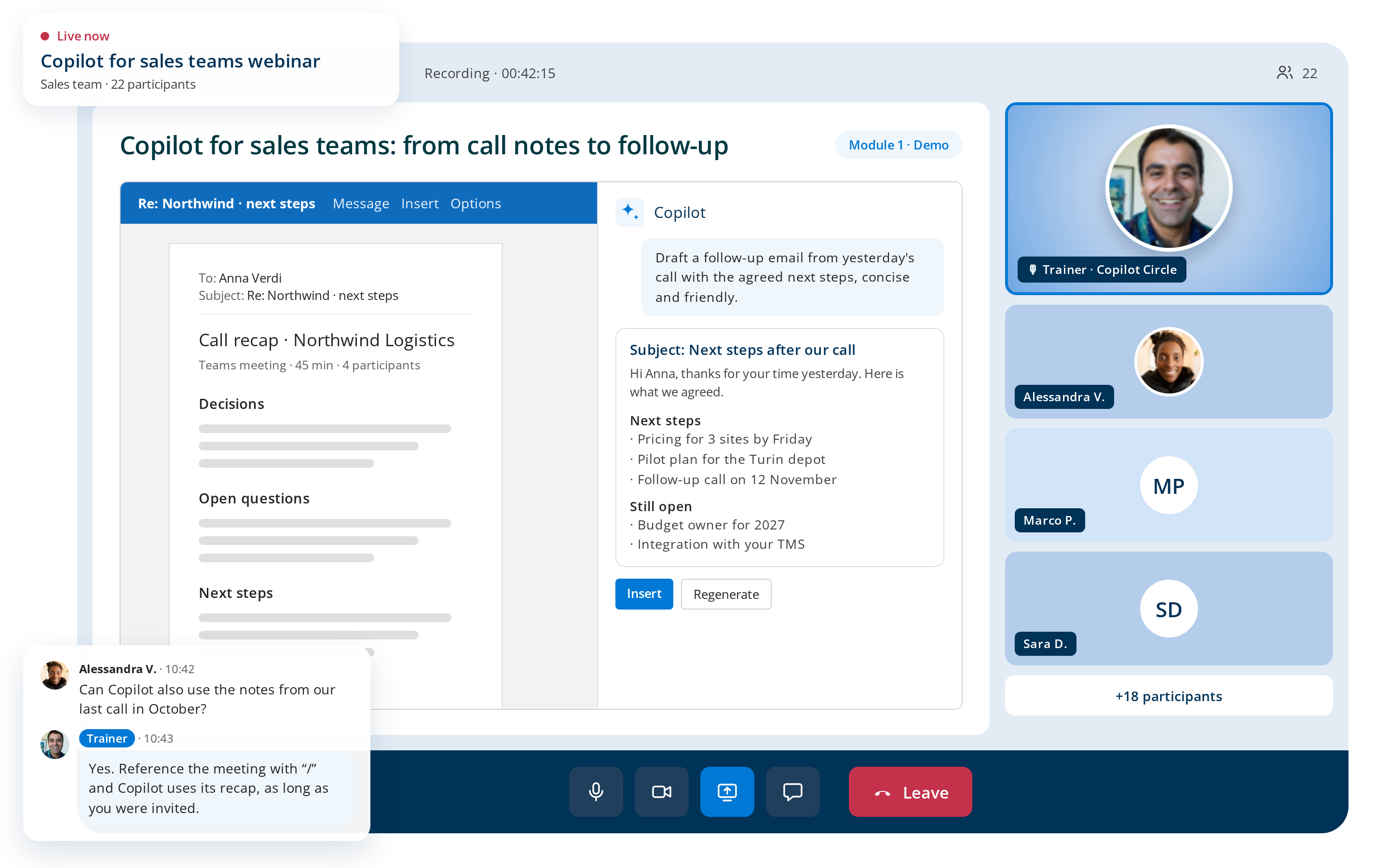
Copilot gathers recent emails, chats and files on the account into a short brief, with open topics and questions to ask.
During the call, everything gets written down and half of what the customer is really asking gets missed.
With transcription on, Copilot lists decisions, objections and next steps, and answers questions while the call is running.
After back-to-back calls, recap emails wait for days and the customer's interest cools down.
Copilot turns the meeting recap into a follow-up email in Outlook, with the agreed next steps. The seller checks it and sends it.
Case studies, terms and product sheets already exist, but rebuilding the proposal still takes hours.
Copilot in Word drafts a tailored proposal from your template, past offers and the customer’s emails, ready for review.
Most sales teams get Copilot, sit through one training session and slip back into old habits within a few weeks, while the license keeps running.
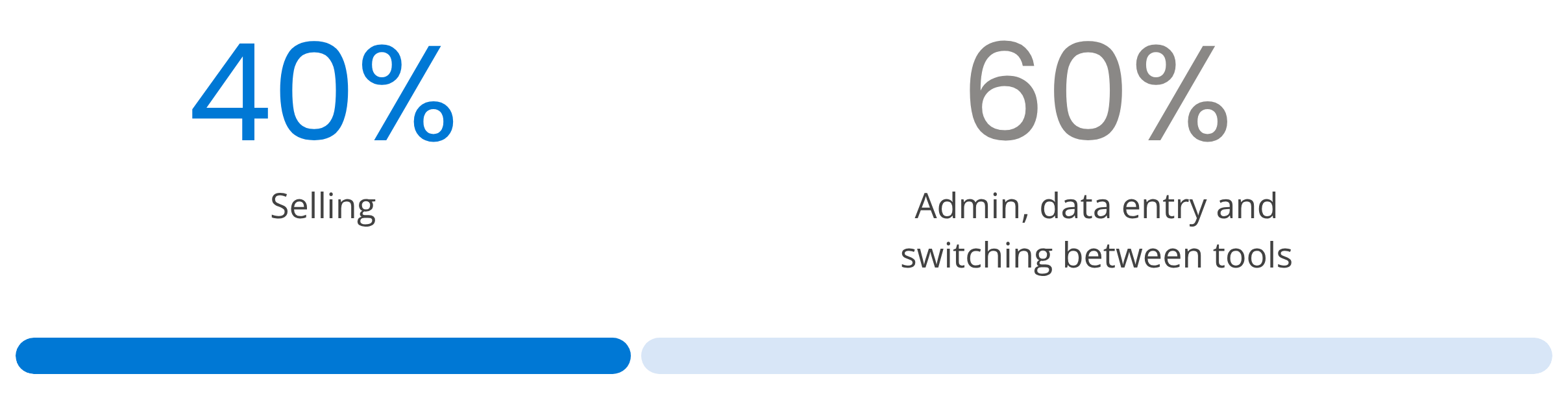
Salesforce, State of Sales, 7th edition, 2026
The Sales agent in Microsoft 365 Copilot at no extra cost connects Copilot to Salesforce or Dynamics 365, so sellers see CRM data where they already work. But someone has to install it, connect the CRM and show sellers when it helps.


Your admin installs the Sales agent from the Agent Store.

The IT team connects it to Salesforce or Dynamics 365.

Copilot Circle shows sellers when to use it, and tracks who does.
An AI Agent connects to your Microsoft 365 tenant, sees how each seller uses Copilot and sends the right prompt, tip or course in Microsoft Teams. No surveys, no extra tool to open.
Usage by team, role and seller, updated in real time.

Each seller is placed in one of 4 maturity levels from usage.

Prompts, tips and courses, sent when they are useful.

Short courses with quizzes and certificates, in 40+ languages.

600+ ready prompts by Microsoft 365 app and role.

Points and badges that make Copilot practice a friendly competition.
Short courses built around the moments of a deal. Every seller learns them between meetings, at their own pace.






Certified trainers work on the accounts and proposals your team handles.
The AI Agent flags who needs a person, not another reminder.

Practical sessions where your team works through hands-on exercises.

Webinars on how to create a personalized offer, speed up responses to customers and improve meetings.

A Copilot specialist reviews progress and plans the next step.
✔ Real sales tasks, not generic demos.
✔ Top sellers who share what works.
✔ Know-how that stays in the team.

Copilot Circle runs in your environment and stores no company data outside it.
Copilot only works with content each seller is already allowed to see.
Native integration with Microsoft Entra ID, operations aligned with Microsoft policies.
With Copilot in the routine, sellers stop pasting offers and customer emails into external AI tools.
Copilot drafts briefs, emails and proposals. Sellers review every word before it reaches a customer.
One of our specialists will get back to you within 24 hours.
No. Sales agent, formerly Copilot for Sales, is Microsoft’s solution included in the Microsoft 365 Copilot license, and it brings Dynamics 365 or Salesforce data into Outlook and Teams. Copilot Circle is what gets sellers to use it, with usage data seller by seller, nudges before calls, prompts and courses. Our guide to Copilot for Sales explains what the Microsoft agent does and how it is licensed.
Yes. Microsoft 365 Copilot already prepares meetings from past emails and files, recaps calls in Teams, drafts follow-ups in Outlook and builds proposals from your templates in Word, with no CRM connection. A CRM adds account and opportunity data to those answers through the Sales agent, but it is not a requirement to start.
Sellers are judged on the pipeline, not on learning a tool, so after one session they go back to what they know and the license keeps running. Copilot Circle sends the right prompt in Teams before a meeting or after a call, when the time saved is obvious, and tracks who has started. That is how use becomes a habit instead of an experiment.
Yes. Copilot works inside your Microsoft 365 tenant and follows the permissions each seller already has in the CRM, and the connection to Salesforce or Dynamics 365 is enabled by an administrator. With Copilot in daily use, sellers also stop pasting offers and customer emails into personal AI accounts.
The technical part takes three steps: an administrator installs the Sales agent from the Agent Store, IT connects it to Salesforce or Dynamics 365, and Copilot Circle shows sellers when to use it. Building the habit takes longer, and that is what the AI Agent, the courses and the live sessions on your real deals are for.